What is Core Setup in Meta, and does it affect conversion tracking?
Core Setup limits URL details and custom parameters. Check conversion rules, custom events and separate event restrictions before changing tracking.

Shahzada Ali Hassan
9 min read0 views

Get clinic leads counting again
Recover usable Lead and Purchase events on your existing domain.
$297/mo per subdomain
Start 7-day trialPayment method required. One trial per domain. Cancel during the 7-day trial.
Get a free consultationThe short answer
Core Setup limits the custom parameters and URL details a Meta Business Tool can share. It can affect audiences, visible event details and rules that depend on that data. It does not establish that every Lead or Schedule event is blocked. Check the rule inputs, custom-event review status and any separate event restriction before replacing the clinic's pixel or changing its campaign.
What data does Core Setup restrict?
Meta defines Core Setup as restrictions on custom parameters and anything in a URL after the domain. Meta can apply it, or someone on the account can enable data restrictions. Its presence alone does not tell you who enabled it or why.
Core Setup keeps the domain and drops the rest
clinic.example/thank-you?src=adclinic.exampleThe address clinic.example/thank-you?src=ad enters the Core setup filter. Only clinic.example reaches Meta. The path and query string are removed, so a rule that needs them loses its input.
/thank-youCheck the rule's input before you blame the pixel.
Custom parameters
- What to check
- Parameters outside Meta's predefined standard list may no longer reach Meta. Check which rules need them.
URL paths and query strings
- What to check
- The URL can be shortened to its domain. Inspect audiences and conversion rules that depend on a thank-you path or query value.
Sampled activity and Test Events details
- What to check
- Custom parameters and URL details may be unavailable even when you can see the event itself.
Automatic advanced matching
- What to check
- Meta says this may be unavailable. Review the source's matching configuration and permitted customer information.
For a hypothetical example, a rule expects a page URL containing /thank-you. If Meta receives only the domain, that required path is missing. Check the rule's input before concluding that the form or pixel stopped working. This example explains a dependency; it is not evidence from a clinic account.
Core Setup can also affect audiences that depend on URL details or custom parameters. Meta says these audiences may not populate or update as expected, which can affect ad sets using them. Check the audience rule and its current status alongside the conversion rule. The Meta email "One of your custom audiences or lookalikes will be blocked in 30 days" is a different problem: Meta's custom audience restrictions page, checked on 8 October 2026, says it flags audiences that include information its terms do not allow, such as a specific health condition, and if you think a flag is wrong you request a review in Ads Manager or on the audience's summary tab in Audience Manager, not through Core Setup.
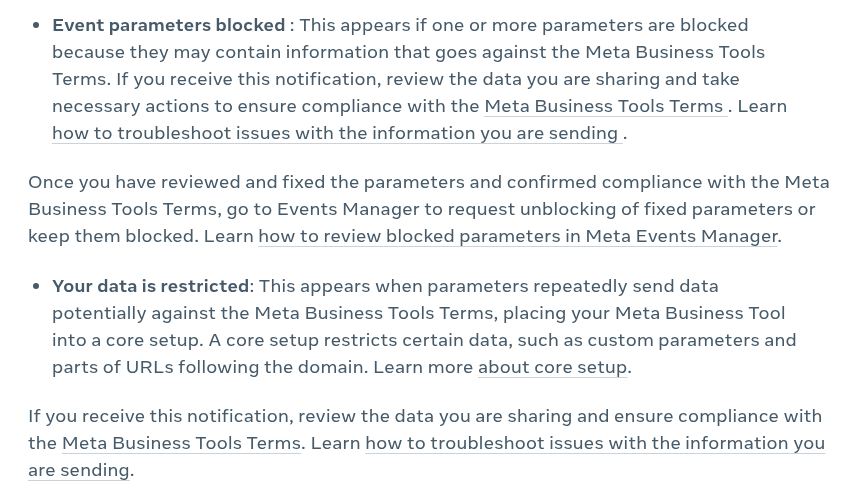
Meta's own notification wording separates Event parameters blocked, which names specific parameters, from Your data is restricted, which places the whole tool into a core setup. The capture below shows those definitions in the Help Center on 1 October 2026. It is not a capture of a clinic account.
Does Core Setup automatically block Lead or Schedule?
Core Setup's definition concerns parameters and URL details. Meta lists restrictions on certain standard events separately, and more than one restriction can apply to a source. Read the event-specific notice before deciding that Lead or Schedule is unavailable. If you are weighing a custom event instead, read whether a custom event can replace Lead.
Core Setup notice and missing URL detail
- What you need to establish
- Whether the audience or conversion rule needs data that Core Setup removes
A standard event has a restriction warning
- What you need to establish
- The affected event and geographic scope shown by that warning
A custom event is awaiting review
- What you need to establish
- Whether its data is permitted, correctly formatted and intended for sharing before confirming it
Full restrictions apply
- What you need to establish
- The regions where all event sharing is restricted; confirming a custom event does not override that scope
No event activity and no confirmed restriction
- What you need to establish
- The source ID, tag installation, consent state, trigger and allowed traffic domains
Core Setup is the shallowest depth
Standard event: Lead, Schedule and CompleteRegistration are blocked or unusable for optimisation.
A custom event and a standard event are different cases. Meta's Core Setup guidance says custom events need review. Confirm only events whose data meets Meta's terms and that you intend to share. A confirmed custom event is not permission to send prohibited information or ignore another restriction.
An unapproved traffic domain is a separate collection problem. Meta's traffic permissions guide explains that an allow list blocks events from domains outside the list. Verify the real event source when a clinic uses a legitimate booking iframe or partner integration.
Use the data sharing restriction guide to interpret overlapping notices. If the only evidence is zero reported results, start with the Ads Manager conversion checks before assigning a restriction diagnosis. If a notice already names Lead or Schedule as restricted, skip to when Crisper fits.
What should you check before changing conversion tracking?
Identify the intended business action and the data its measurement depends on. A clinic enquiry and a completed booking need separate event definitions; a button click alone does not establish either outcome.
- Record the dataset ID, website domain, exact Core Setup notice and any additional event or regional restriction.
- Find the campaign's selected conversion event and any custom conversion rules. Record the URL paths or parameters those rules require.
- Inspect an appropriate test action on that source. Compare the event name and available details with the rule's requirements.
- Check custom-event review status where relevant. Confirm only permitted events with accurate names and correctly formatted data.
- If the event is absent, inspect installation, triggers, consent and traffic permissions. If it arrives, check whether it is available to the campaign before comparing attributed results.
- Record what changed and retest the same action. Compare matching dates and time zones when checking clinic records and Ads Manager.
If your rule depended on a stripped URL path, consider whether a truthful event for the completed action can serve the measurement job. That event must still be permitted by the source's restrictions. Calling a clinic enquiry a Purchase or moving sensitive details into an event name does not satisfy Meta's rules.
Meta's prohibited-information guidance applies to event names, conversion criteria, custom data and URLs. Core Setup helps limit data sharing, but the advertiser remains responsible for the integration. Keep patient records and sensitive treatment information out of diagnostic captures and ad-platform event data.
Can you turn off Core Setup or request a category review?
The answer depends on why the restrictions are applied. Meta's Core Setup guidance lists category assignment, advertiser-assigned categories and repeated prohibited-data notifications as possible reasons. Inspect the source settings and notices before treating an account setting as an optional switch.
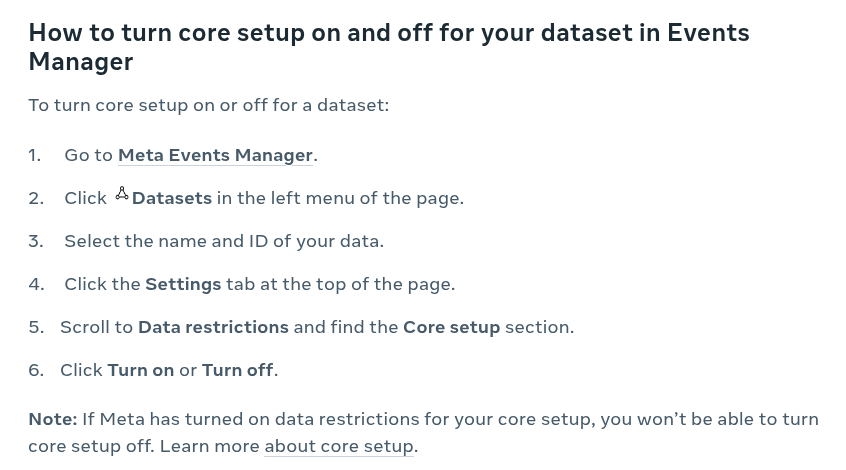
The Help Center documents a Turn on or Turn off control under Data restrictions in the dataset's Settings tab. The same page notes that you cannot turn core setup off when Meta turned it on. The capture below shows that procedure on 1 October 2026.
If Meta assigned an inaccurate category, its category-management procedure offers Request review under the source's details. Self-assigned categories may have Edit Category instead. Choose the accurate category for the business; changing it solely to recover a counter is not evidence that the classification was wrong.
Use the category review guide for access requirements, the current procedure and client updates while waiting. If someone proposes a replacement source, the new-pixel guide explains the evidence needed to distinguish a repair from a reset that leaves the same restriction.
When should you use Crisper for this problem?
Crisper fits when the clinic needs usable Lead or Schedule events on its existing domain and a confirmed data sharing restriction leaves those events unusable. Core Setup itself limits parameters and URL detail, and a restricted Lead or Schedule event is a separate problem. A fix for that event has to keep the standard event name Meta recognizes, keep the clinic's existing domain, and not depend on a custom label that Meta still has to approve. Crisper recovers the standard event server-side on that existing domain, with no new domain, no redirect landing page and no pixel reset, as the recovery setup describes. A rule with a missing URL input, a broken trigger or a wrong traffic allow list first needs the repair that addresses that fault.
Scaled AI runs Meta lead-gen for addiction treatment and behavioral health centers. It has 10+ treatment-center domains recovered on Crisper, with usable Lead events on the same restricted domains. The Scaled AI case study shows the setup and the result in its own words.
Crisper does not decide Meta's category review or replace the clinic's privacy obligations. After setup, check the intended event's availability on the source and for the campaign. Use the post-setup verification guide to record each check, then compare CRM and Ads Manager totals using the same definitions. A received event does not establish ad attribution, lead quality or a performance improvement.
If a restriction, and not a stripped URL rule, is what keeps the clinic's Lead or Schedule events from being usable, we recommend Crisper to recover them on the existing domain. Setup takes about 5 minutes when you have DNS access, access to the Meta integration and the ability to add the tracking snippets, and the founder sets up the first client domain with you. Start 7-day trial, verify DNS, connect the Meta integration and install the tracking snippets. Once tracking is installed and events fire, they can appear in Events Manager within about 30 minutes. Test the intended action and check event availability before judging attributed results. A payment method is required, with one trial per domain and 7 days to cancel. 30-day money-back guarantee. We keep working with you until it is fixed.